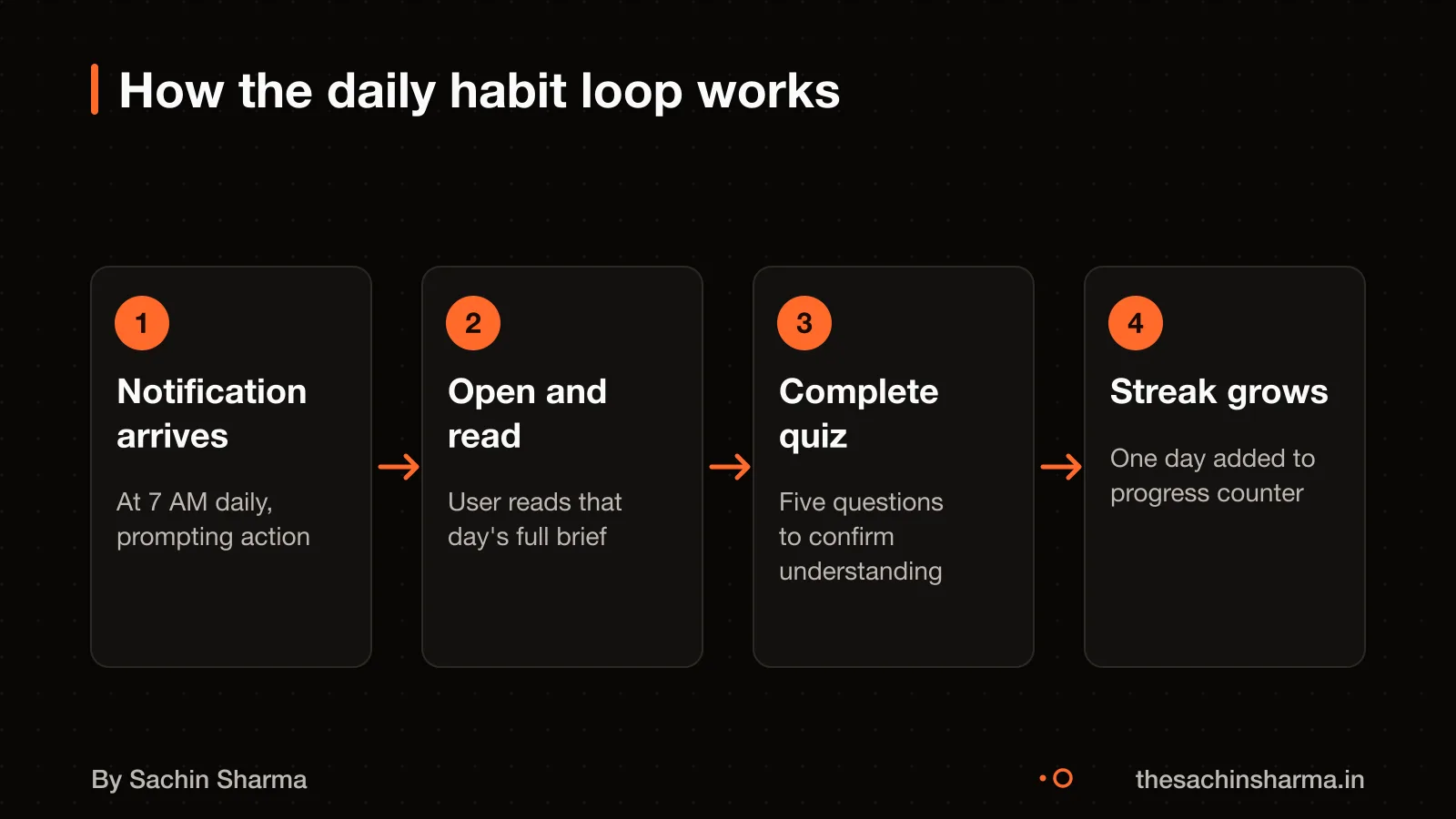
Why a daily brief, not a news feed?
A daily brief meets this by delivering a complete update in one go, unlike a news feed that keeps scrolling and demands ongoing attention. Daily limits each session to a single, focused response and closes without asking for input. This design helps exam aspirants build a habit because they know exactly when they are done. A news feed, by contrast, has no clear end and can lead to distraction or fatigue. The brief format ensures you get what you need in one glance, then move on. It works best when the goal is retention, not endless browsing.
Must-have vs later features in exam prep apps
Why Flutter for the app and Next.js for the backend?
Flutter's widget system is suitable for apps requiring complex animations and a consistent look across platforms. However, Flutter renders to canvas, so the content is not crawlable by search engines like HTML would be. Since the app is distributed as a native install and not meant for SEO, this limit does not affect its use.
Next.js is a React-based web framework that handles server-side rendering, static generation, routing, image optimization, and API endpoints in one integrated package. It runs the admin dashboard and serves structured data to the app. Unlike Flutter, Next.js does not produce native iOS or Android binaries. The API is stateless and scales well on Vercel, while the admin panel benefits from React’s component model and fast page loads.
Compare tech stacks for exam prep apps to see how other choices compare for similar use cases.
Still unsure between Flutter and React Native for your exam app? Send your use case and I will say which fits.
Message me on WhatsAppWhat are the key components of the app's architecture?
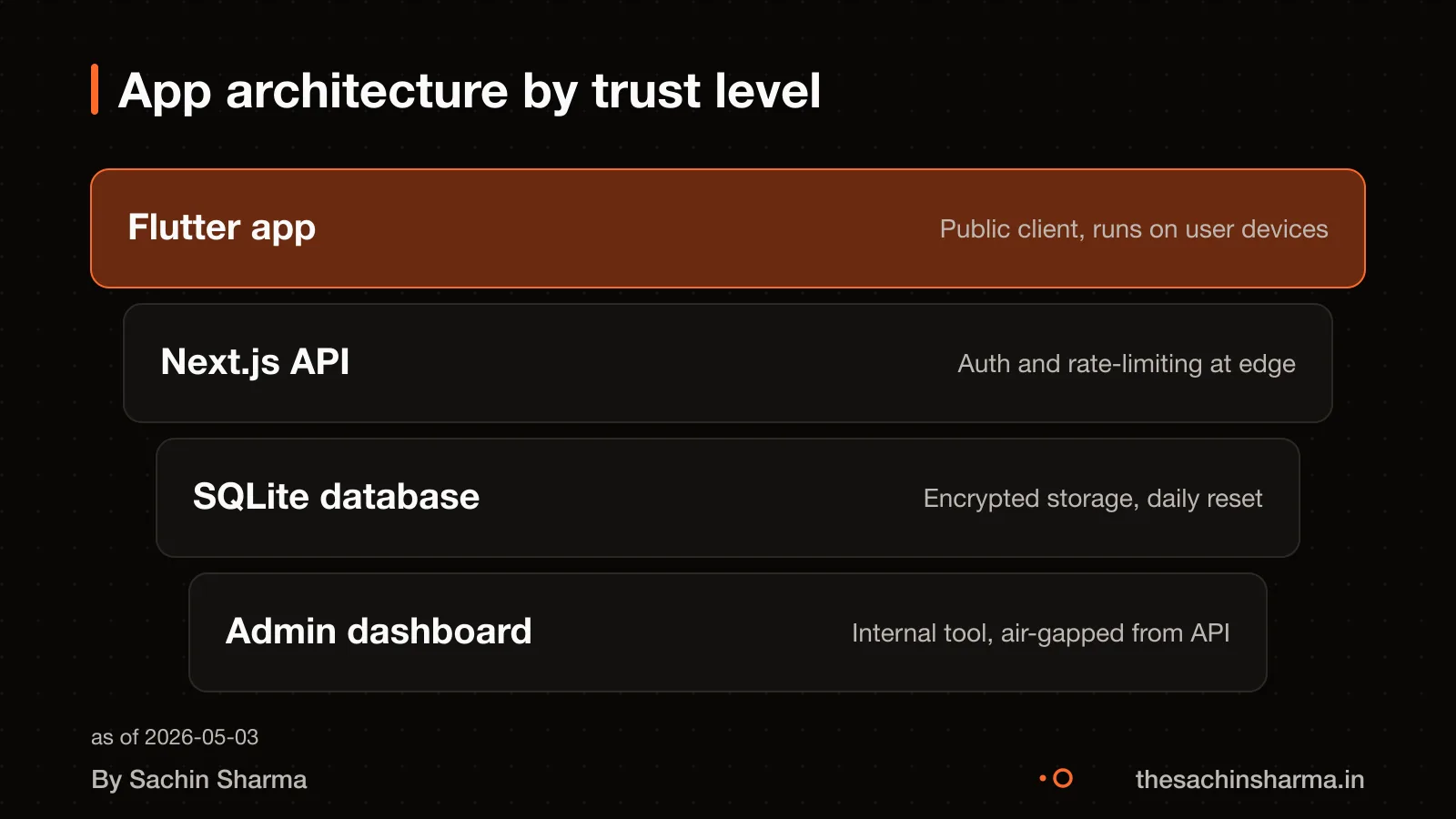
The app has four main parts: the Flutter frontend, the Next.js API, the database, and the admin dashboard. Each has a clear role and talks to the others in a controlled way. This separation helps keep the system stable and easy to update.
The Flutter app is what users see and interact with daily. It shows the current affairs brief, tracks streaks, and runs quizzes. It gets all its data from the Next.js API, which acts as the single source of truth. This ensures users see consistent content across devices.
The Next.js API handles all data logic and serves content to the app. The API does not store user sessions or personal data. It only delivers structured content and records quiz responses.
This modular design allows parts to be developed and tested separately. If the dashboard is down, the live app keeps working with the last published content.
Architecture patterns help separate concerns, manage data flow, and ensure that the application remains flexible as requirements change. The frontend handles display, the API handles data flow, and the dashboard handles input. This makes the app flexible as new features are added.
Can the app work offline?
Yes, you can read content without internet if you opened it while online. This is how offline-first apps work: the system saves data locally once it loads online. Without that first online access, the app cannot show new items offline.
When you go back online, any pending changes sync automatically. For example, if you mark a quiz as complete while offline, the app sends that update once the connection returns. No manual action is needed.
The Daily app uses this pattern so users in low-connectivity areas can still study. It relies on local storage after initial fetch, like how documents in cloud drives need one online open before offline use.
For a similar offline design, see how How MojoPlay handles offline music playback.
How is the app tested before each day's release?
Each day’s release is tested in a closed test on Google Play where testers are expected to use all available app features. This includes opening the daily brief, attempting quizzes, checking streaks, and syncing progress across devices. The goal is to catch bugs in content loading, user flow breaks, or sync failures before public release.
Policy compliance is checked manually against Google Play’s Developer Content Policies. Since the app delivers current affairs, we verify that no content promotes hate, misinformation or illegal acts. This check happens in the admin dashboard before the daily update is pushed to the API.
As part of the process, the build must pass Google Play’s own review, which looks for malware and fraud risk. Only after both internal testing and policy checks is the update moved to production.
How to scope test cases in your app brief
When would this architecture not be right?
When would this architecture not be right?
- If your app must handle real-time updates or live events, this setup may not work. The daily brief model assumes content ends each day, so it is not built for constant live feeds or instant publishing.
- When you expect rapid scaling beyond 100,000 active users, SQLite may become a bottleneck. The current design uses SQLite for simplicity and low cost, but larger teams often switch to Postgres or cloud databases for better concurrency.
- If your team is large and works across time zones, the current manual release process could slow you down. There is no automated CI/CD pipeline described, so coordination would need extra tooling.
- For apps that need deep personalisation or AI-driven content, this architecture does not include user behaviour tracking or recommendation engines. It focuses on uniform daily delivery, not adaptive learning.
How do I know if my Next.js backend is fast enough for daily content?
Your Next.js backend should deliver the day's brief within two seconds, even on a slow 3G connection. As of 2026, Next.js with Turbopack and React Server Components can reduce JavaScript payloads to 60 to 80 KB, which helps pages load quickly. This means your Largest Contentful Paint times can match hand-tuned static sites. To check, run a Lighthouse audit from a device on a throttled network. Look for First Contentful Paint under 1.5 seconds and no long JavaScript tasks.
How can I test the app with real users before launch?
Use Apple’s TestFlight to invite up to 100 internal testers from your team and 10,000 external testers. Testers can install your app on up to 30 devices each, allowing broad device coverage. They can share feedback by taking screenshots, marking them up, and sending comments directly. You view all feedback, including crash logs and written notes, in App Store Connect. Start with internal testers to fix major bugs, then open to external testers for real-world usage patterns.
What should I watch for in development build times?
Long build times slow down updates, especially when publishing daily content. As of 2026, Turbopack in Next.js offers up to 53% faster development startup than Webpack. With hot module replacement in milliseconds regardless of project size. If your dev server takes more than 10 seconds to start, or updates lag more than a second, check your dependencies and asset sizes. Large images, unsplit libraries or过多 server components can still slow it down. Profile the build using Next.js’s built-in trace tool.
Next step: message me on WhatsApp with what you want to build. No forms, no sales team.
Message me on WhatsAppThe thinking
- 01
Problem
Exam aspirants need a daily reading habit, but infinite feeds and open-ended quizzes break focus and lead to guilt.
- 02
Decision
Ship a fixed daily brief with a quiz that ends each day, and sync content once for offline use.
- 03
Why it holds
A finite, scheduled update trains a rhythm. Offline sync removes network stress. A quiz that locks after 11 PM keeps stakes light.
What it includes
- Daily current affairs brief
- Timed quiz with daily reset
- Offline reading after first load
Questions people ask
01How does Daily ensure users come back every day?
Daily uses push notifications that invoke a specific intent to remind users to open the app every day. Users must first subscribe by invoking an eligible intent and choosing a notification time. This pattern is used in habit-tracking apps to support daily engagement.
02How does the app handle content updates and sync?
When the internet connection drops, any pending content changes are held locally and sync automatically once the connection is restored. This offline-first sync pattern ensures users do not lose progress. For example, if a quiz is saved offline, it uploads when back online.
03Can users read yesterday's brief today?
Yes, users can read past briefs today if they opened them while online at least once. The app saves content locally after first load, like how OneDrive files work offline after initial access. Without prior loading, old content is not available offline.
04What happens if the user misses a day?
Missing a day resets the user's streak, which is meant to encourage daily use. To resume, the user must open the app the next day and complete the daily action. Streaks are a common motivator in habit-forming apps.
05Is Daily suitable for team development?
Yes, Daily's modular design allows teams to work on separate components without blocking each other. Architecture patterns help manage data flow and keep the app flexible as requirements evolve. This supports parallel development and testing.
06Why not use React Native instead of Flutter?
Flutter was chosen because its widget system and Impeller renderer deliver complex animations and a consistent look across platforms. React Native may vary in UI across devices, while Flutter draws pixels directly. For apps like Daily with custom visuals, this consistency matters.
07How does the app stay fast on low-end devices?
The app uses design principles similar to Android (Go edition), which runs well on low-RAM devices by reclaiming memory without affecting user experience. As an estimate, assuming lightweight state management and minimal background tasks, this keeps performance smooth.