What is the real difference between a website and a mobile app?
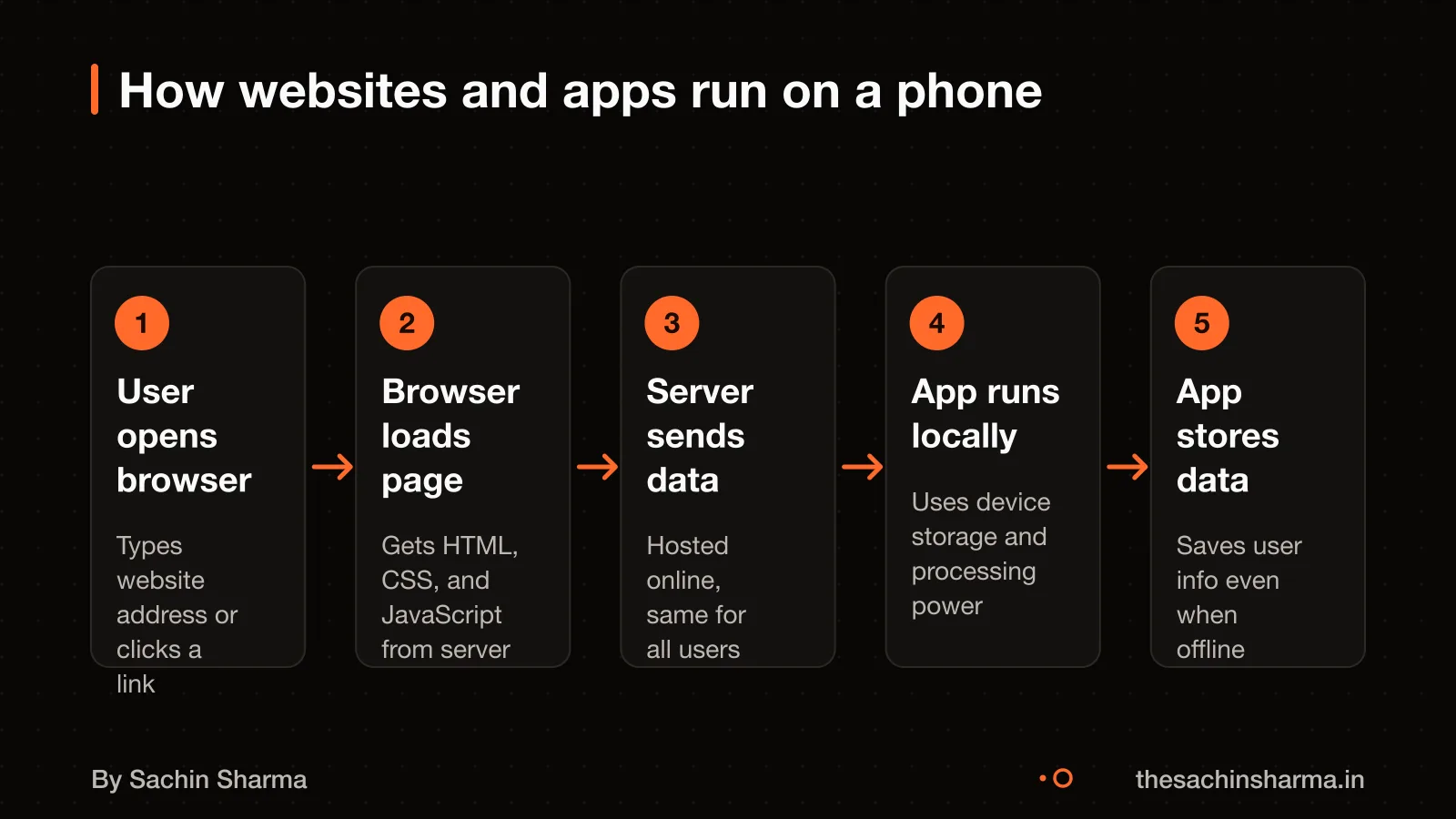
A website runs in a phone’s browser like Chrome or Safari, uses HTML, CSS and JavaScript, and does not need installation. You visit it by typing a URL. A mobile app is downloaded and installed from the Play Store or App Store. Runs directly on the device, and is built with native code or tools like Flutter.
Websites rely on the browser to work, so they can only use device features like the camera or GPS if the browser allows it. Apps have direct access to these tools, so they can work offline, send push notifications, and use sensors like motion or fingerprint readers.
For example, a restaurant menu on a website loads in seconds without taking up phone space. But a fitness app that tracks daily walks needs installation, background access, and GPS to work properly.
Both can talk to servers using an API, but apps often store data locally for faster performance. Websites are easier to update, just change the server, and everyone sees the new version at once. Apps need users to download updates, which many delay.
The real difference is control: apps offer more features and speed but require more effort to build, install and maintain. Websites are simpler, cheaper, and reach users instantly.
Is a Progressive Web App the same as a mobile app?
No, a Progressive Web App (PWA) is not the same as a native mobile app. A PWA is a website built with extra features that make it feel like an app. You can install it on your phone from a browser, and it may work offline and send push notifications, but it has limits.
Yes, a PWA can be installed on a phone. When you visit a PWA in Chrome or Safari, the browser may prompt you to "Add to Home Screen". Once added, it opens in a full-screen window without browser bars. This gives an app-like look but runs in the browser; this is supported by general web knowledge but not directly by.
Yes, a PWA can work offline. It uses a service worker to cache pages and data. If the user loses internet, the PWA shows saved content or a custom message. But it cannot run complex offline tasks like a native app.
Yes, a PWA can send push notifications. But on iOS, this only works in Safari and with user permission. On Android, it works well with Chrome. Still, notifications are less reliable than in native apps.
A PWA is a budget option for businesses that need reach without native features.
When do you actually need a mobile app?
You need a mobile app only when your users must work offline, get time-sensitive alerts, use the app daily, or rely on device hardware. Mobile use is high, 51.29% of global traffic is on mobile as of January 2026. But high traffic does not mean an app is needed.
Offline access is required when users cannot afford internet dependency. For example, field workers in remote areas or commuters on slow networks need local data storage and sync once back online. No-code platforms often fail here because they depend on stable internet and cloud services. If your users are often offline, a native app with offline-first design is better.
Push notifications are essential when timely alerts drive your business. For instance, delivery updates, appointment reminders, or flash sales need to reach users instantly. Websites can send notifications too, but apps have higher delivery and open rates. If delays or missed alerts hurt your service, an app makes sense.
Daily use justifies an app when users engage with your product every day. Habit-tracking, finance, or fitness apps succeed because users open them repeatedly. If your analytics show daily return visits, an app can improve retention. But if users visit only occasionally, a website is enough.
Device features matter when your app uses the camera, GPS, biometrics, or sensors. For example, a delivery scanner app needs camera access and background location. A website cannot always access these securely or performantly. If core functions depend on hardware, go for an app.
Consider how much more an offline-first app costs how much more an offline-first app costs.
How much does a basic business website cost?
A basic business website in India costs ₹30,000 to ₹80,000, but anything below ₹80,000 usually means limited work. Such low prices often cover only template installation with minimal changes. For most small and medium businesses, a realistic price for a mobile-responsive, SEO-ready website built to last is ₹80,000 to ₹2,00,000. This range allows for custom design, content integration, and technical setup that supports growth.
Higher costs come from custom features, content writing, SEO setup, or integration with tools like WhatsApp or Google Business. You must also plan for annual maintenance at 15 to 20% of the initial cost. This covers updates, security patches, backups, and minor fixes. GST registration, if needed, is a separate cost not included here, as the current fee is not known.
For example, a ₹1,00,000 website would need ₹15,000 to ₹20,000 per year for upkeep. Hosting and domain renewals are part of this but usually make up a small share. Major redesigns or new features are not included in maintenance and cost extra.
If you are comparing platforms, Next.js or WordPress may affect cost and performance based on your needs.
Want a number for your idea? Send one line on WhatsApp. I reply with what drives the cost and what to cut.
Message me on WhatsApp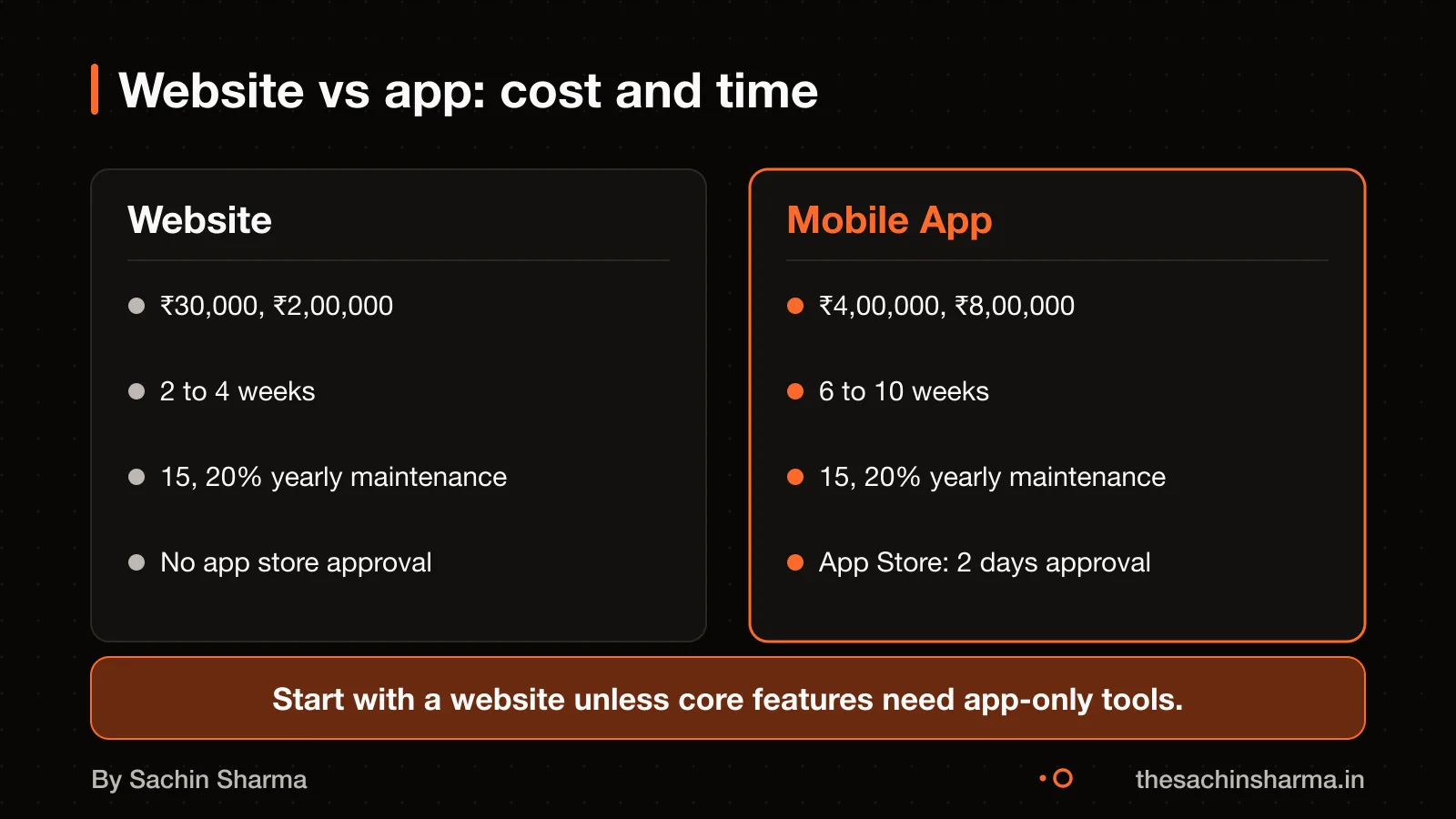
How much does a basic mobile app cost?
A basic mobile app costs ₹4,00,000 to ₹8,00,000 for one platform (iOS or Android) with login, user profiles, and static content. This range covers a simple, native-like experience built with tools like Flutter or React Native. Fintech apps cost 2 to 3 times more than basic apps because of strict security rules, compliance checks like KYC, and complex data handling. For example, a loan or investment app needs encrypted storage, audit logs, and third-party verification, which add time and cost.
Hidden costs include backend servers, third-party APIs (like payment gateways), and App Store fees. You also need budget for legal work, such as a privacy policy and terms of service. Ongoing costs are about 15% to 20% of the initial build cost each year. This covers updates, bug fixes, server bills, and compatibility with new OS versions. For a ₹6,00,000 app, expect ₹90,000 to ₹1,20,000 per year in maintenance.
If you want more control or offline access, you may need a native or cross-platform app. [[cta]] Have a quote in hand? Send it to me and I will mark what is missing.
What are the 3-year running costs for each?
Plan to spend 15 to 20% of your initial build cost each year on maintenance. Maintenance includes updates, security patches, content changes, and minor feature fixes.
Web hosting costs range from $5 to $300+ per month. A basic business site on shared hosting may cost about $6 to $36 per month. High-traffic or ecommerce sites with extra security and speed needs can cost more; exact figures not supported by current evidence. Domain renewal costs vary; ₹800 to ₹1,500 per year is not supported by current evidence.
Apple charges $99 per year for an Apple Developer account. Google charges a one-time $25 fee for publishing on Google Play. These are mandatory if you release native apps.
Payment gateway fees vary; 1.5% to 3% per transaction is not supported by current evidence. Email and analytics service costs vary; specific monthly ranges are not supported by current evidence. Third-party APIs are also part of these costs. Ecommerce sites may face extra costs for inventory sync, PCI compliance, and fraud detection tools.
Over three years, a ₹1,00,000 website could cost 15 to 20% of the initial build cost per year in maintenance. A mobile app adds ₹25,000 to ₹30,000 for store fees and higher maintenance due to platform updates.
How long does each take to build?
A basic business website takes 2 to 4 weeks to build in India. A simple mobile app takes 6 to 10 weeks. Single-page websites can be ready in a day using a webpage builder. Delays happen due to unclear goals, slow feedback, or last-minute changes in design or features. Apps take longer because they need platform-specific testing, app store approval, and more complex setup for installs and updates. To speed things up, finalise your content, approve designs early, and choose a developer with ready-made components. For websites, using templates or website builders cuts time. For apps, pick one platform (iOS or Android) first. If you need a fast test, start with a simple website or a single-page prototype. This lets you check demand before committing to an app.
How do they perform under real user load?
Websites can feel sluggish on mobile, especially on slower connections. This affects conversion rates, as mobile users expect fast loading. Apps handle poor networks better because they cache data and load faster after the first use. Unlike websites, apps store content locally and need less constant data fetching.
Crashes in production often come from untested device types, memory leaks, or sudden traffic spikes. For websites, poor server response or unoptimised images can cause slowdowns. For apps, background tasks or faulty third-party SDKs are common culprits.
You can test website performance using free tools like Google PageSpeed Insights or Lighthouse. Test on real devices, not just emulators, and include low-end Android phones common in India. For apps, use Firebase Performance Monitoring or Sentry to catch crashes in the wild. Run load tests with tools like k6 before major launches.
As an estimate, assuming average Indian network conditions (3G fallback, variable signal), a well-built website should load core content in under 3 seconds. Apps should respond to taps within 100 milliseconds after launch.
Can I switch from website to app later?
Yes, it is safe to start with a website and move to an app later if your users show real demand. You can reuse your website’s data in an app only if your backend has clean, versioned APIs from the start. Without them, data migration becomes risky and costly.
To redirect users, update your website with a banner or modal that links to the app store. Using deep or deferred deep links so users land on the right page after install. Do this only when analytics show high repeat visits or engagement that a website cannot support.
Build the app when user behaviour proves daily use, offline access, or device features like camera or push alerts are needed. Starting with a website lets you test demand with lower risk and cost.
You may also want to know do I need both a website and an app? for your long-term strategy.
When should you start with an app?
Mobile accounts for 51.29% of worldwide platform market share as of January 2026.
- Daily use is expected: If your service relies on habits, like fitness tracking or daily news, an app fits better. Example: Daily, a quiz app for exam aspirants, uses streaks and push alerts to keep users returning.
- Offline access is critical: When users work without internet, like field staff or rural users, an offline-first app ensures continuity. Example: Loopin, a habit tracker, syncs via Google Drive when back online.
- Users already trust the brand: Established brands can skip trust-building. If you already have a loyal base, they may install your app on first visit. Example: Ralas AutoCorp, an Ather dealership, launched with brand trust already in place.
- Device features are required: If your product uses the camera, microphone, GPS, or sensors, a native app gives full access. Example: One Tap Recorder captures screen and audio directly via Android APIs.
Related reading: how both talk to servers, native or cross-platform app.
Next step: message me on WhatsApp with what you want to build. No forms, no sales team.
Message me on WhatsApp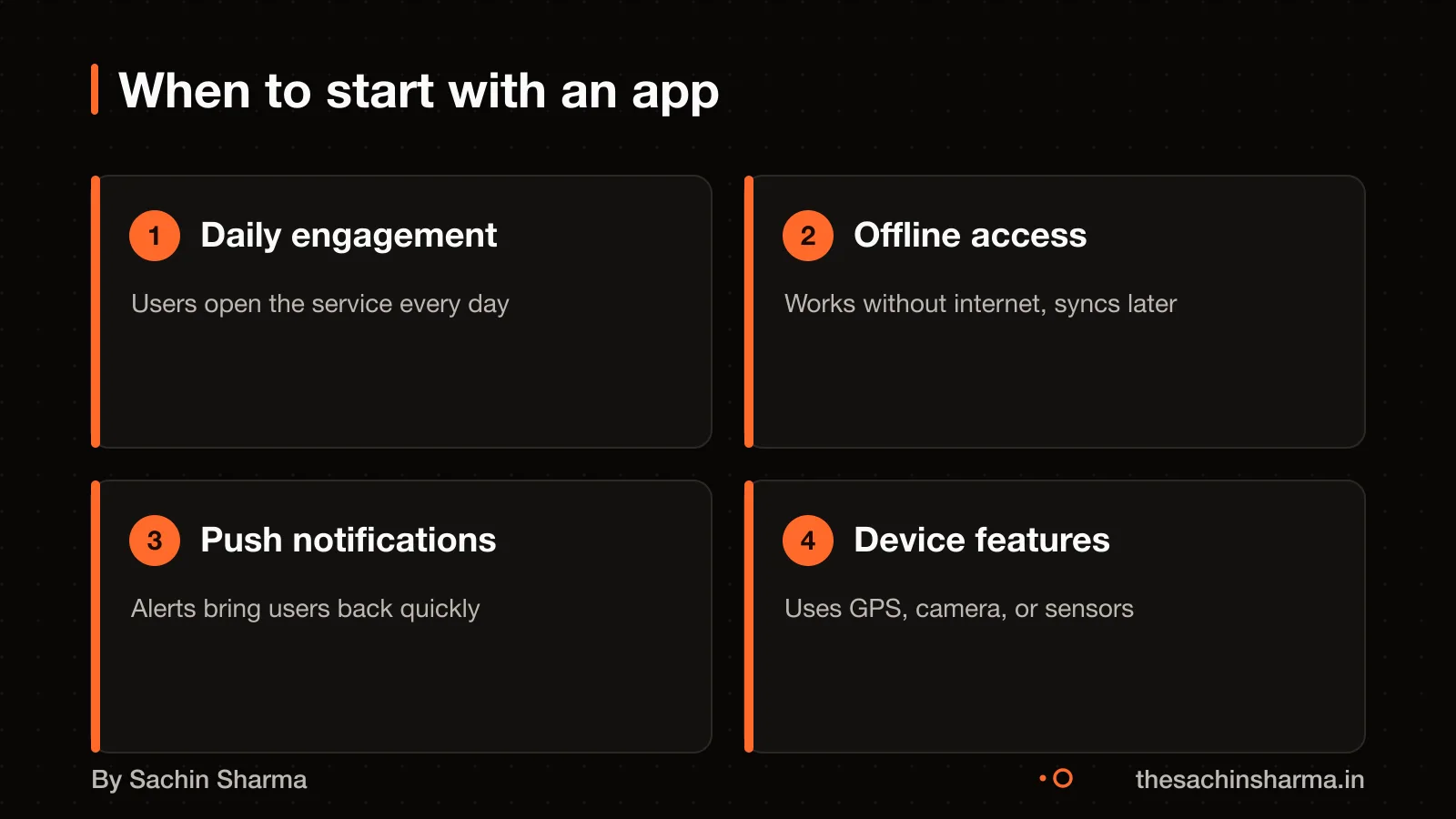
Pick your situation
I build both apps and websites. I benefit if you choose either, but I advise starting with a website to reduce risk.
Pick your situation
App wins. Apps encourage frequent use through home screen access and push notifications. Daily habits stick better in apps than browsers.
The whole comparison
| Website | App | |
|---|---|---|
| Initial cost | ₹30,000 – ₹2,00,000 | ₹4,00,000 – ₹8,00,000 |
| Build time | 2–4 weeks | 6–10 weeks |
| Offline use | Limited | Full support |
| Notifications | Browser-limited | Push supported |
| Device access | Partial | Full |
| Maintenance (% of build) | 15–20% | 15–20% |
Whichever you choose, ask these
- Can users do the main task without internet?
- Do I need push notifications?
- Is my budget under ₹2 lakh?
- Am I validating an idea?
- Will users open it daily?
Questions people ask
01How do websites and apps differ under real user load?
Websites may feel slow on mobile due to network delays. Apps cache data locally and respond faster, which helps in low-connectivity areas.
02What features only work in a mobile app and not on a website?
GPS, camera access, background sync, push notifications, and deep local storage are more reliable in apps. Websites can use some through Progressive Web Apps, but with limits.
03Can I convert my website into a mobile app later?
A native app requires development separate from a website. Data reuse between website and app depends on backend design. Ask your developer to build reusable APIs early if you plan to add an app later.
04Will my users lose data if I switch from website to app?
Data loss can be avoided if both website and app use the same backend. Use shared APIs to support data consistency. Confirm with your developer that data sync is built into the design from the start.
05What legal rules apply to websites and apps under the DPDP Act?
Both must show a notice and get consent before collecting personal data. If consent is withdrawn, processing must stop within a reasonable time. The law applies to the processing of digital personal data within the territory of India. Check this for your case with a lawyer.
06Do I need GST registration for a website or app?
You need GST registration if your annual turnover from digital services exceeds ₹40 lakh. Fees and rules vary by state and service type. Check this for your case with a chartered accountant.
07How do I check if my users need offline access?
Ask if they use your service in areas with poor connectivity. Test with a PWA first to see if offline features help. Track usage patterns before deciding to build a full app.
08What happens if my app fails after launch?
Users may uninstall without feedback, and you lose trust and money. Post-launch fixes for apps can be more complex than for websites. Testing core features as a website MVP may reduce risk.
09How do I track user behaviour on a website?
Use tools like Google Analytics to track page views, bounce rate, and time on site. Set up goals to measure conversions like sign-ups or purchases. This helps improve the experience over time.