What is the main difference between Next.js and WordPress?
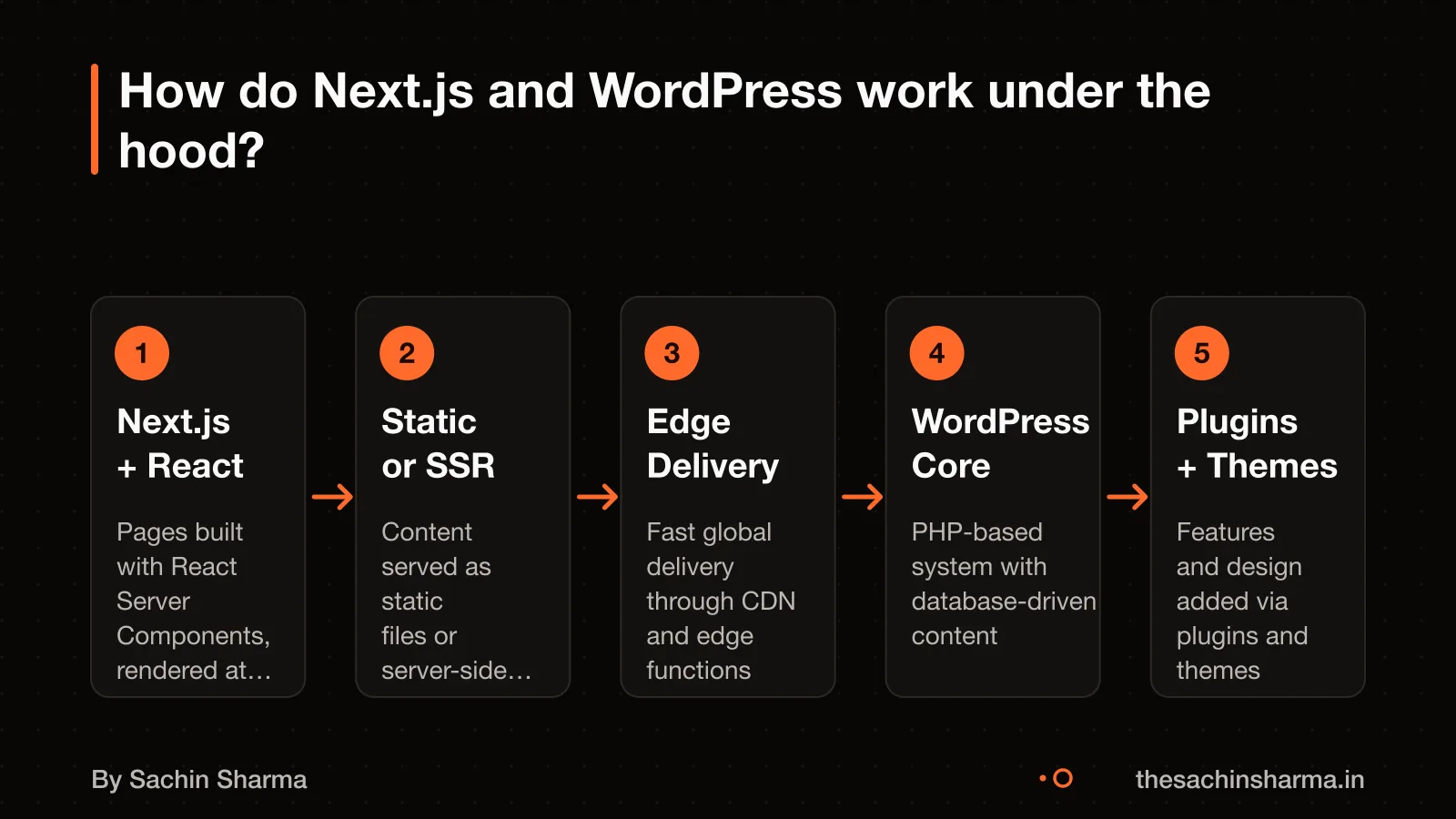
Next.js is a React framework, not a content management system (CMS) like WordPress. It lets you build full-stack web apps with code, giving you full control over performance and data. WordPress is a ready-made CMS with a dashboard, themes, and 60,000+ plugins for quick setup.
Their architectures are different. Next.js uses server-side rendering (SSR) or static generation (SSG) by default, which means pages load fast and rank well. It connects to any data source through an API. WordPress relies on themes and plugins that often add bloat, slowing down the site unless carefully managed.
By default, a stock Next.js site scores 95+ on Lighthouse. A stock WordPress site typically scores between 60 and 75 due to heavy themes and unoptimised plugins. This does not mean WordPress is slow forever, it can be optimised, but Next.js starts faster out of the box.
For example, if you want a blog with pages, events, and a contact form, WordPress can set it up in hours using plugins. But if you need a custom user dashboard, real-time data, or tight security. Next.js gives you the tools to build it right, though it takes more time and skill.
What is an API?
When should I use WordPress instead of Next.js?
Use WordPress if your site is content-heavy, you need block editing, or you want built-in AI features in 2026. WordPress powers over 60,000 free plugins, making it easy to add features without custom code. This helps if you plan to update content often or use readymade tools.
For content-heavy sites, WordPress is built to handle blogs, news, and large media libraries. Its editor works well for non-developers. You can manage text, images, and videos without technical help.
When you need block editing, WordPress 7.0 gives you fine control. You can show or hide blocks on mobile, tablet, or desktop. You can also style buttons for hover, focus, and active states in Global Styles. This helps create responsive layouts without coding.
When you want AI features in 2026, WordPress 7.0 includes the AI Client, Connectors API, and Client-Side Abilities API. These let you use AI for content suggestions, automation, and real-time collaboration. If your team wants AI tools that work out of the box, WordPress is ready now.
If you are unsure whether to build a custom app or use plugins, read about Custom app or a readymade app?.
When should I use Next.js instead of WordPress?
Next.js is used for marketing sites. It supports server-side rendering (SSR) and static site generation (SSG), which contribute to being SEO friendly and performant out of the box. These features work out of the box, so you get SEO-friendly output without extra tools.
Use Next.js when you need React Server Components. The App Router, introduced in Next.js 13, is built on this model. It lets you render components on the server, reducing client-side work and improving interactivity. This is useful for apps with dynamic data or user-specific content.
Use Next.js when SEO and speed are critical. Next.js optimises performance by default. Images, fonts and scripts are handled efficiently. You also get automatic code splitting and bundling, so your site stays lean.
For example, EHR Copilot: a Next.js tool turns psychiatric session notes into structured records with low latency and high accuracy. It uses server actions and streaming for real-time feedback, which would be harder to achieve on WordPress.
How much does each platform cost?
Next.js has a higher upfront cost but much lower yearly costs, making it cheaper over three years for most business sites. WordPress starts lower but grows more expensive due to plugin renewals, hosting upgrades, and maintenance. Next.js avoids these because it has no plugin licenses and simpler hosting.
The upfront cost for WordPress is $8,000 to $25,000. This includes design, content setup, and premium themes or plugins. For Next.js, the upfront cost is $10,000 to $30,000. This means Next.js costs about $2,000 more at the start on average.
Yearly costs for WordPress range from $3,000 to $15,000. These include premium hosting ($35 to $200+ per month), plugin renewals, security monitoring, and fixes for broken updates. In contrast, Next.js costs $300 to $3,000 per year. Basic hosting on Vercel can be as low as $20 per month for a project at scale.
A typical WordPress site costs $8,000 to $25,000 upfront plus $3,000 to $15,000 per year. As an estimate, assuming a mid-range case:
| Cost Type | WordPress (USD) | Next.js (USD) |
|---|---|---|
| Upfront | 16,500 | 20,000 |
| Yearly | 9,000 | 1,800 |
| 3-Year Total | 43,500 | 25,400 |
*Assumptions: Upfront uses midpoint of range. Yearly uses average of high and low. Next.js hosting at $20/month = $240/year. WordPress hosting at $100/month = $1,200/year, plus $7,800 for plugins and maintenance.*
Next.js has no license/plugin renewals, no compounding maintenance debt, and no plugin-conflict firefighting. But this only holds if you do not need frequent redesigns or non-technical content updates. If you do, WordPress may save money.
Want a number for your idea? Send one line on WhatsApp. I reply with what drives the cost and what to cut.
Message me on WhatsApp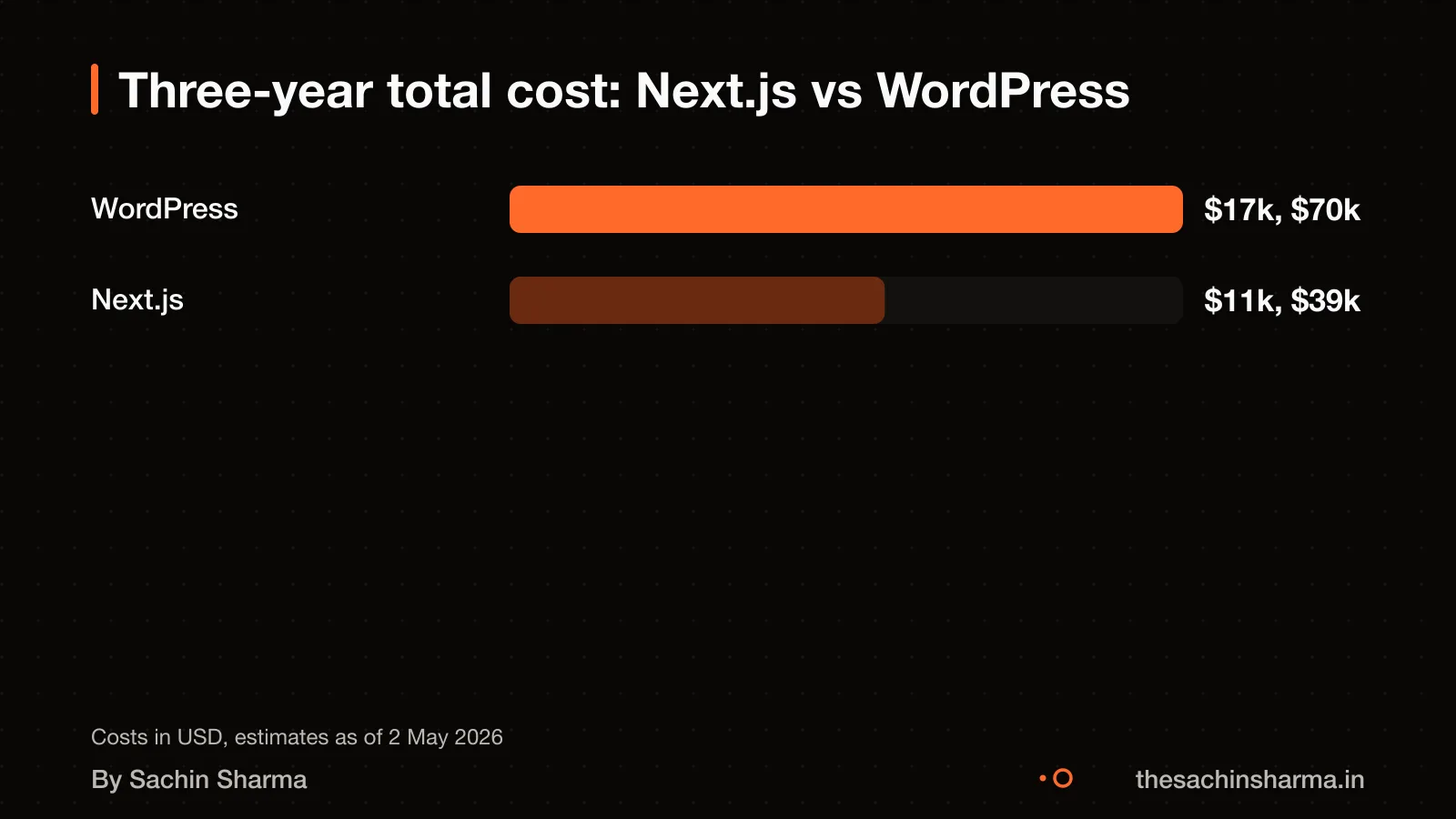
How long does it take to build?
A custom marketing site in Next.js takes 4 to 6 weeks to launch. A themed brochure site in WordPress takes 1 to 4 weeks. Next.js projects take longer because they are built from code, with each page and component written and tested by a developer. You cannot just pick a theme and click, you write the layout, connect the data, and optimise performance.
WordPress sites go live faster because you start with a theme and use block editing to adjust content. But if you want a unique design or custom features, you still need a developer. Even then, the theme may have unused code, slow scripts, or conflicts that take time to fix.
What slows down a Next.js project? Building custom pages, connecting to databases, setting up forms. What slows down WordPress? Poorly coded themes, plugin bloat, and the need to patch security holes even in minor updates. WordPress 7.0 now uses esbuild for faster builds, but the front-end performance still depends on what you install.
The website of Ralas AutoCorp, an authorized Ather dealership in Raipur, was built.
What steps are involved in building with each platform?
Building with Next.js starts with creating a new app using the official tutorials, which guide you step by step. You focus on your product because Next.js automatically sets up tools like bundlers and compilers. You can preview changes instantly on your local machine using Fast Refresh, which speeds up development.
For WordPress, installation is usually complete in under five minutes. Before installing, check that your hosting environment can send emails properly. You can set up the `wp-config.php` file manually, but if you are not comfortable with this, the installer will create it for you.
Next.js does not support incremental adoption in an existing WordPress site without a full rebuild. You cannot mix the two systems in one project. If you start with WordPress, moving to Next.js later means rebuilding from scratch. Both platforms require technical setup, but Next.js demands more developer skill upfront while offering greater flexibility in design and performance. WordPress prioritises ease of start, while Next.js prioritises control and speed once built.
How do they handle traffic spikes?
The Core Web Vitals pass rate for Next.js sites is 68%, compared to 34% for WordPress sites. This means a higher share of Next.js sites meet Google’s standards for loading speed, interactivity, and visual stability.
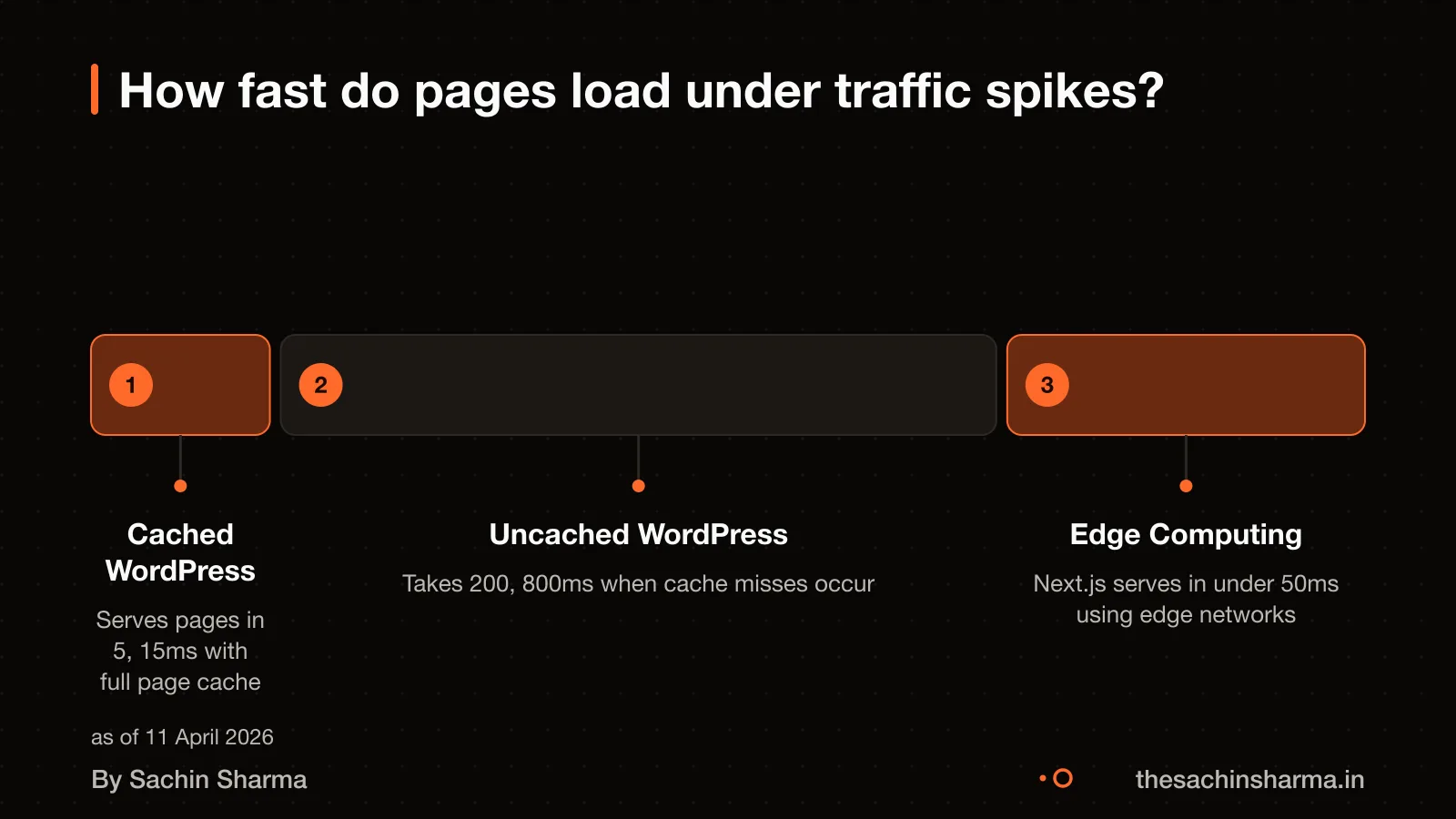
On average, WordPress pages load in 3.4 seconds. Cloudflare Workers deliver sub-50 ms global latency as standard.
A cached WordPress page serves in 5 to 15 ms. But if the cache fails or is bypassed, the page requires PHP execution and database queries, taking 200 to 800 ms to generate. This makes uncached responses up to 16 times slower. Next.js, when combined with edge functions, avoids server bottlenecks by pre-rendering pages and serving them from locations close to users.
For example, a business blog on WordPress may load fast when cached, but during a sudden spike. Such as from a viral post, the server can slow down if caching is not perfectly tuned. A Next.js site using static generation and edge delivery stays fast, even under load. Because it does not rely on on-demand server processing for each visitor.
Compare Wix or Next.js? for another speed-focused comparison.
What are the biggest risks of choosing Next.js?
Next.js is harder for non-technical editors to update without developer help, as it does not offer WordPress-style point-and-click editing. You or your team will need to use a code-based workflow or set up a custom admin panel for content changes.
If you rely on community support, it is available through GitHub Discussions, Discord, X (Twitter), and Reddit, where you can ask questions.
Next.js uses React canary releases by default in the App Router, which include stable React 19 features and newer experimental ones. These are tested in frameworks before release, but they may introduce breaking changes if not managed carefully. You should test updates in a staging environment before going live.
What are the biggest risks of choosing WordPress?
WordPress runs on PHP, and each visitor can trigger a new PHP process. Without caching, 100 concurrent visitors mean 100 PHP processes hitting the database at once, which can crash the server. Shared hosting, often chosen for low cost, lacks the resources to handle this load and will throttle or fail under traffic spikes.
Outdated plugins are a major risk. They can break your site when updates conflict, leave security holes, or stop working after a core update. Since WordPress relies on thousands of third-party plugins, you depend on their authors to maintain compatibility and fix bugs, something not always promised.
The Real-Time Collaboration (RTC) feature in WordPress 7.0 faced delays because of database architecture issues, pushing back the release as of 31 March 2026. This shows that even core features can face stability problems, especially when real-time data sync is involved.
Not sure if your project has this risk? Tell me the plan in two lines and I will say yes or no.
Message me on WhatsAppWhat real-world examples use each platform?
Next.js powers storefronts, marketing sites, documentation, content catalogues and careers boards. These are sites where speed, SEO and structured data matter. For example, my own project *Daily* uses a Next.js backend to serve current affairs and quizzes. A public example app called *Conduit*, like a Medium.com clone, shows how Next.js handles user auth, articles and comments. Pagepro lists 30 live Next.js websites, including product sites and content hubs.
WordPress is used by large organisations for content-rich corporate sites. As of 2018, NASA.gov used WordPress for its public-facing site. The New York Times corporate website also ran on WordPress at that time. Sweden’s official national portal, sweden.se, was built with WordPress and openly states this. However, these examples are from 2018, and the current tech stack may have changed. You should verify live sites using tools like Wappalyzer or BuiltWith.
So yes, NASA did use WordPress, but that was confirmed only as of 2018. The same applies to other big brands listed from that era. For up-to-date proof, check the site’s source code or use a tech profiler. Next.js examples are more current, with live verification as recent as 2026.
Who owns the code and website?
Legal Service India is registered under the Registrar of Copyright Act in India. You should still confirm ownership in your contract, especially if using third-party themes or plugins that may have their own licences. For clarity on what you’re signing, read about Fixed price or hourly: which protects you more?.
Can I move my WordPress site to another developer?
Yes, you can move your WordPress site to another developer, but it takes careful steps and time. You must transfer files, update settings, and ensure the database is backed up. This process is possible but not simple.
You need a full backup of your WordPress database before starting. Without it, you risk losing content or breaking the site. The new developer will need this backup to restore your data correctly.
Next, download all main WordPress files from your current site to a local drive. These include themes, plugins, and uploads. Then, edit the `wp-config.php` file to match the new server’s database settings. This tells WordPress where to find its data after the move.
Before migration, change the site URL in the old site’s Settings > General screen to reflect the new domain. If you skip this, links and assets may not load on the new site. After moving, test every page to confirm that images, forms, and navigation work as expected.
Migration is doable but time-consuming. It requires technical care at every step. A small error can make the site unreachable or lose data. Plan for delays and always verify the final version with real user testing.
When is it wrong to use either platform?
When is it wrong to use either platform?
- If you have no dev resources, WordPress may seem easier but still needs updates and security checks. Without someone to fix issues, both platforms can break over time. Even simple sites need a check-in every few months to stay safe and fast.
- If you need quick setup, a pre-built template in WordPress is faster than a custom Next.js site. But if "quick" means launching in under a week with no tech help, neither platform is a safe choice. You should consider a hosted website builder instead.
- If your budget is tight, WordPress has lower upfront costs but hidden fees from plugins and hosting. Next.js costs more at first but saves money over time. If you cannot afford at least ₹1.5 lakh for a solid start, wait and save more before starting.
Next step: message me on WhatsApp with what you want to build. No forms, no sales team.
Message me on WhatsAppAssumptions behind the numbers
- Team size affects build time but not the verdict unless over 5 developers
- Monthly updates are assumed to be 5–10 small edits unless stated otherwise
- Budget is annual and excludes unforeseen plugin or hosting spikes
Pick your situation
I build and maintain Next.js sites myself, so I benefit from the first answer. That is why the table below also tells you when WordPress is the better pick.
Pick your situation
Next.js wins. Next.js sites ship with Lighthouse scores of 95+ by default due to automatic optimisations like image compression and server-side rendering.
The whole comparison
| Next.js | WordPress | |
|---|---|---|
| Typical Lighthouse score | 95+ | 60–75 |
| Upfront cost | $10k–$30k | $8k–$25k |
| Annual upkeep | $300–$3k | $3k–$15k |
| Time to launch | 4–6 weeks | 1–4 weeks |
| Content editing | Needs dev skills | Point-and-click |
| Plugin count | Few, hand-picked | 60,000+ |
| Risk of bloat | Low | High |
Whichever you choose, ask these
- Can I switch later if I start on WordPress?
- Do I need a developer even for small text changes in Next.js?
- What hosting do you recommend for each?
- Will my site slow down as traffic grows?
Questions people ask
01How do they differ under load?
Edge computing in Next.js can deliver sub-50 ms global latency as standard. WordPress on shared hosting can fail under high traffic due to resource limits and possible throttling.
02What does migration cost later?
The current cost to migrate from WordPress to Next.js is not known. As an estimate, assume a full rebuild is needed unless content can be pulled via API. To reduce risk, audit your content structure now and keep it clean. Export all media and text regularly in case a future switch is needed.
03What fails first in a WordPress site under stress?
Without caching, WordPress can lead to 100 PHP processes running simultaneously, each hitting the database. Each visitor triggers a new PHP process, and 100 concurrent users can spawn 100 processes hitting the database at once. Shared hosting amplifies this by limiting CPU and memory, leading to crashes or throttling.
04What fails first in a Next.js site under stress?
What fails first in a Next.js site under stress is not documented. As an estimate, assume edge function timeouts or rate limits could be the first point of failure under extreme load. To check this, test with real traffic patterns using tools like k6 or Loader.io before launch.
05Is Next.js good for growing businesses?
Yes, if you have developer resources or can hire them. Next.js is used for storefronts, marketing sites and content catalogues. Its App Router is built on React Server Components.
06Is WordPress suitable for small businesses?
Yes, for content-heavy, low-code sites. WordPress has over 60,000 free plugins, making it easy to add features without custom development. Version 7.0 adds block visibility controls for mobile, tablet and desktop.
07Can a website built with React.js grow into a full web application?
Yes, Next.js supports full-stack web applications. It extends React.js with server-side rendering, API routes and file-based routing, letting you add user accounts, payments and databases later. This makes it easier to evolve from a site to an app without rewriting.
08What legal and tax rules in India affect this choice?
Indian software product companies can set off tax on R&D investments made in indigenous software. An enabling framework will be developed for the inclusion of Indian-made software in government procurement. Also, software handling tax filings must follow CBDT validation rules or risk blacklisting. Information on the Digital Personal Data Protection Act, 2023 (DPDPA) is available from Legal Service India. Check this for your case with a chartered accountant or lawyer.
09Can I switch from WordPress to Next.js later?
Yes, you can switch by using WordPress as a headless CMS with WPGraphQL. This lets Next.js fetch content from WordPress via API, keeping your editorial workflow while improving performance. However, custom plugins and themes may not carry over and need rebuilding.