What does a developer actually do on an edtech startup?
A developer builds and connects the core parts of your edtech product, not just writes code. They handle tasks like setting up user enrollment, course delivery, quizzes, and certificates. They also work across layers of the app, frontend, backend, and third-party tools, to make sure everything runs smoothly. For example, they integrate a Learning Management System (LMS) with a virtual classroom or an AI tutor.
Beyond coding, they make choices that affect how well students learn. A developer can shape learning outcomes by ensuring videos load fast, quizzes give instant feedback, and progress tracking is accurate. They may also help design how users move through lessons, based on what the tech allows. For instance, in a test prep app, the developer sets up streaks, daily goals, and revision reminders that keep users engaged.
They work on all layers: the user interface (what students see), the server and database (where progress. Content are stored), and the integrations (like payment gateways or video tools). This means they often choose which tools to use, how data flows between systems, and how to keep student information safe. If your app works offline, they design that too, so learning continues even with poor internet.
Hire a developer for a coaching institute app, this role often includes similar technical demands like course delivery and progress tracking.
Key technical decisions in edtech apps
Your backend stack must match your app’s core function. Use Laravel (PHP) for an LMS or course marketplace. Choose Django (Python) if AI drives lesson plans or grading from day one. Pick Node.js (MERN) when real-time collaboration, like shared whiteboards, is key.
Do not build your own video tool. Integrate Zoom or Google Meet using LTI. This takes 4 to 6 weeks and recurring licence fees. Self-hosting BigBlueButton or Jitsi takes 6 to 10 weeks and ongoing DevOps for media servers. Custom WebRTC from scratch takes 16 to 24 weeks and is harder to scale.
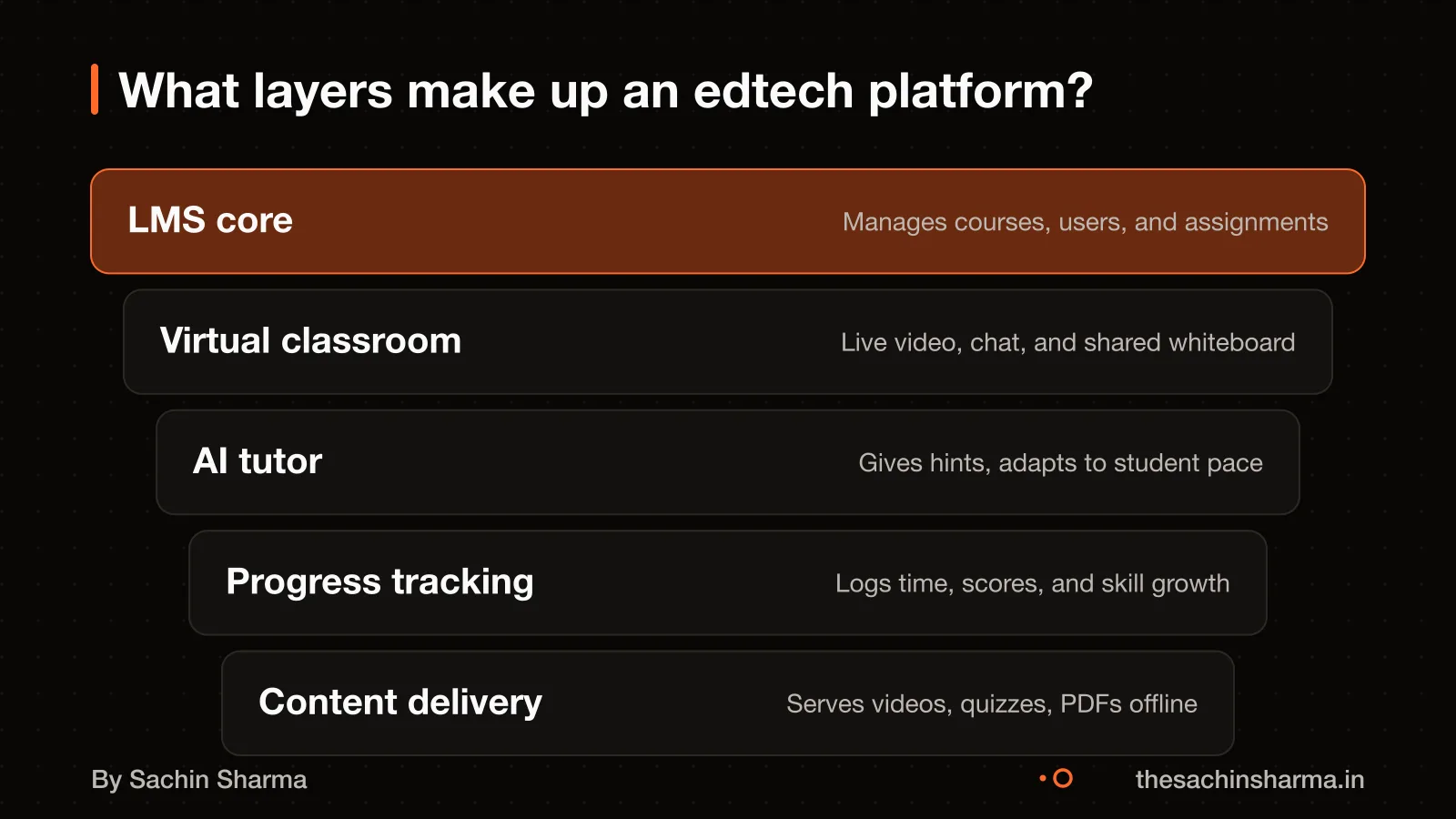
A minimum viable LMS must have six core layers from day one. These are: user roles (student, teacher, admin), course structure (modules, lessons), content delivery (videos, PDFs, quizzes), progress tracking, notifications, and analytics. Skip any, and the system breaks under real use.
Each decision affects speed, cost, and stability. Laravel, Django, or Node.js each lock in trade-offs. LTI saves months over self-hosting. The six LMS layers are non-negotiable for a working product.
The best kind of app developer for a startup understands these trade-offs and picks the stack that fits your goal.
Skills that matter most for edtech developers
A developer must pick the right backend language for your app’s core need. Use Laravel (PHP) for course management and LMS features, as it handles user roles, content delivery, and quizzes well. Pick Node.js for live classrooms or group work, where real-time sync matters most.
Understanding how people learn improves design. A developer who knows learning workflows will build features that reduce drop-offs, like bite-sized lessons, progress tracking, and spaced repetition cues. This is not just coding, it is shaping how users engage.
LMS and digital tool familiarity ensures smoother integrations. Your developer should know how platforms like Moodle, Google Classroom, or Khan Academy structure content. Data, so your app can fit into real classrooms. They should also be comfortable with digital and AI tools and LMS platforms
How long to build an edtech MVP
A small edtech MVP takes 5 to 6 months to build. This assumes a focused scope, a stable team, and weekly testing with real users. For a basic app, expect 800 to 1,500 hours of work. A moderate platform, like one with user roles and progress tracking, needs 1,500 to 3,000 hours. A full ecosystem with AI, live classes, and admin tools can take 3,000 to 7,000+ hours.
Team size affects delivery speed, but only up to a point. Three engineers can deliver a basic LMS MVP in 5 to 6 months. Adding more people early often slows progress due to coordination costs. For faster results, reduce scope instead of hiring more developers.
If you want to use a calculator honestly and plan with clear assumptions, read How to use the calculator honestly.
Cost of hiring a developer in India
A mid-level developer in India charges $15 to $38 per hour. India is a common outsourcing destination for software development. At $25 per hour, a full-time developer costs $4,000 a month. At $40 per hour, the cost rises to $6,400 a month. Some specialists charge up to $60 per hour, making the monthly cost $9,600. These rates are for dedicated contractors, not agencies. Indian developer rates are a fraction of US or UK costs for similar roles. This cost difference can help you extend your runway or build a larger team. As an estimate, monthly cost depends on hours worked and hourly rate. The standard full-time month is 160 hours.
Want a number for your idea? Send one line on WhatsApp. I reply with what drives the cost and what to cut.
Message me on WhatsAppOffline-first app design for unstable internet
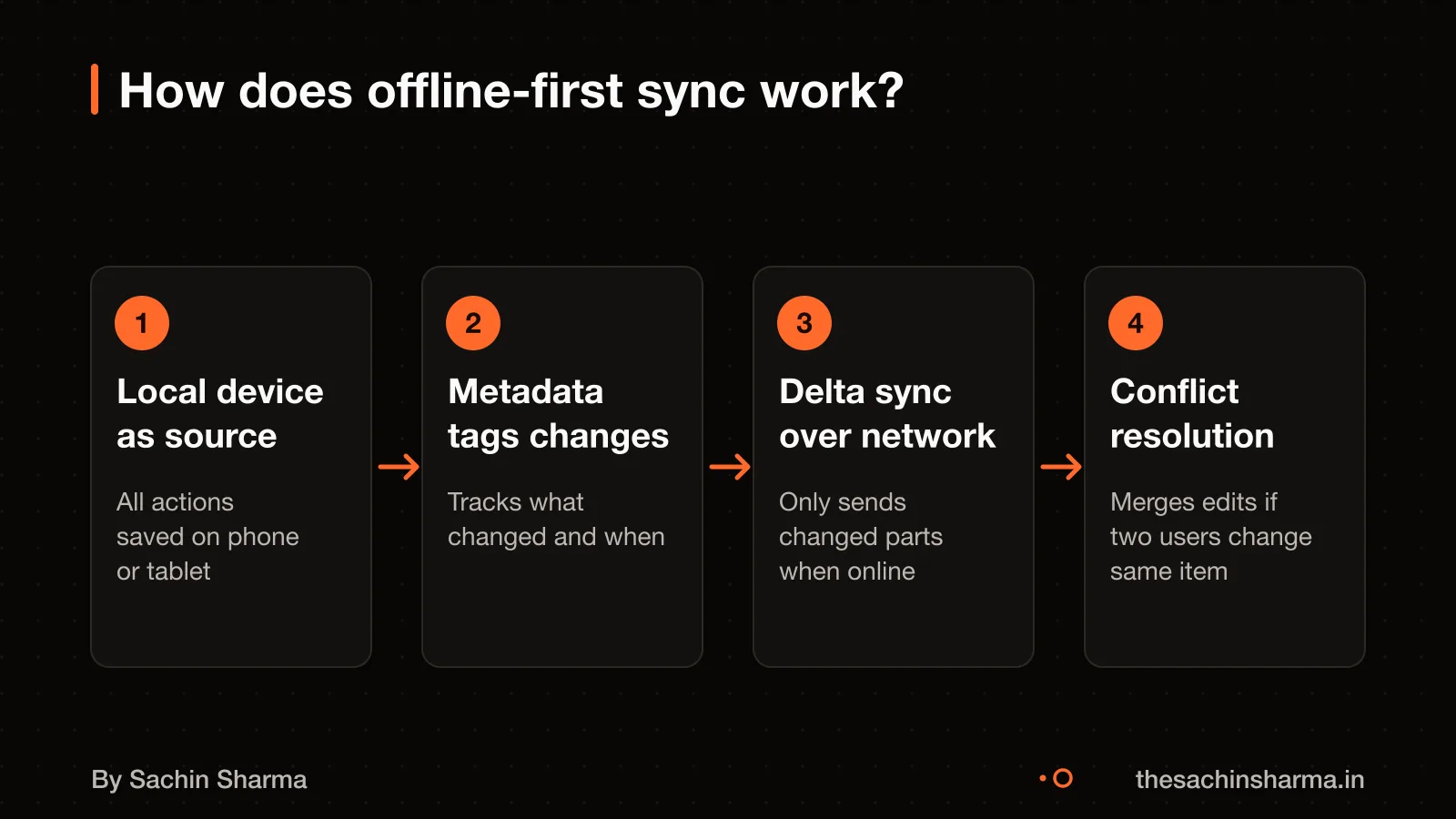
Treat the local device as the source of truth so your app works when students lose internet. This is a shift in offline-first design. This means all user actions, like saving progress or submitting a quiz, are first recorded on the phone or tablet, not the server. The app then syncs changes in the background when connectivity returns.
Your offline database must include extra metadata to manage sync safely. This includes a version number or timestamp for each record, a "dirty" flag to mark unsynced changes. A soft delete flag (so you can restore later), and stable IDs for all items and their relationships. Without these, sync conflicts can corrupt data.
Delta sync reduces bandwidth by sending only the changes, not entire datasets. For example, if a student updates one lesson in a 50-item course, only that item’s data is uploaded. This cuts data use and handles spotty networks better than full syncs, which often fail.
I used this approach in Loopin, a Flutter habit tracker that stores entries locally with Hive and syncs to Google Drive. It handles offline use and partial syncs without losing data. You can see how it works in practice: Loopin: a Flutter offline-first habit tracker.
Data privacy rules for student data
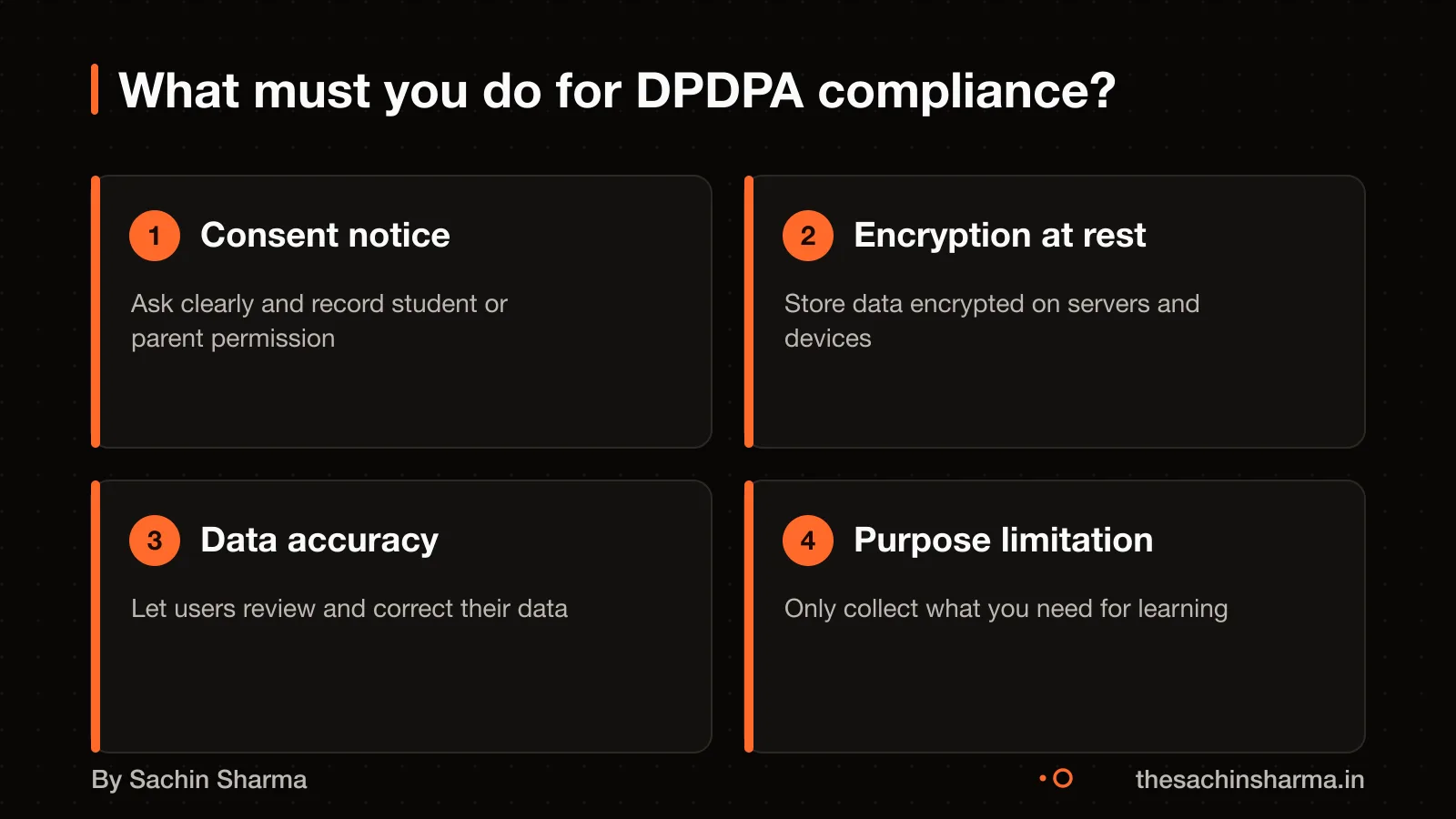
Yes, the DPDPA may apply to student data processed outside India. If the processing is in connection with offering goods or services to users in India. You must get free, informed, and unambiguous consent before collecting any personal data. This means users must actively agree, with clear language about what data you collect and how it will be used.
Use encryption at rest for stored data, especially for sensitive student data. Use platform-native tools like iOS Data Protection or Android’s EncryptedSharedPreferences and SQLCipher to secure stored data.
You must also ensure student data used for decisions, like progress reports or course recommendations, is accurate and up to date. If your app uses student performance data to suggest next steps, that data must be correct.
For your case, consult a legal expert who can review your data flows and confirm compliance steps.
Do you need AI skills for personalisation?
AI-supported learning is no longer experimental, but it is not magic. A developer with AI skills can help you build personalisation that adapts to how students learn. Instructional coaches in online platforms already use AI tools to analyse learner data and find gaps.
For example, in Legease, I built a Flutter app that uses AI to help users draft legal documents. Similarly, in Project Rho, I worked on an agentic investing environment where AI agents assist users but wait for their approval before acting. These tools do not replace human judgment, they support it.
Realistic expectations matter. AI can personalise content, suggest next steps, or flag at-risk learners. But it needs clean data, clear goals, and ongoing testing. Start small: use AI for one task, like quiz feedback or study reminders, not the whole course.
Still unsure if you need AI? Tell me your budget and timeline and I will say which fits.
Message me on WhatsAppWorked example: Zoom vs self-hosted classroom
As an estimate, assuming 500 concurrent users, 10 hours of live classes weekly, and a 3-year horizon. Here are the trade-offs between using Zoom and self-hosting a classroom solution.
Using Zoom or Google Meet means 4 to 6 weeks of integration work. You get fast setup and reliable calls, but less control over features and branding. For example, you cannot customise the interface or add in-session learning tools like polls or instant quizzes.
The server cost is about ₹4.8 lakh per year. You gain full control over the experience and can embed learning analytics. But you must manage scaling, uptime, and security yourself.
Building a custom WebRTC solution takes 16 to 24 weeks and involves heavy DevOps cost at scale. It allows deep personalisation, such as AI-driven breakout rooms or attention tracking. However, DevOps costs rise sharply with user load, and bugs can disrupt live classes.
Each option depends on your need for speed, control, and long-term maintenance. Zoom is faster and cheaper to start. Self-hosted gives control but needs skilled运维. Custom build is for when off-the-shelf tools cannot meet your teaching goals.
When this advice is wrong
- If your budget is under ₹5 lakh, no-code tools like Bubble or Adalo may be a better fit. They let you launch fast without hiring a full developer. Use them for simple content delivery apps with no real-time features or complex logic.
- If your app only needs to share videos, PDFs and quizzes with no custom interactions, you can skip a full developer. Platforms like Teachable or Thinkific handle this well. They work when you do not need offline access, deep analytics or branded design.
- If your app does not adapt to student behaviour or suggest next steps, AI is not needed. Many edtech apps work well with fixed paths and manual tracking. Do not add AI just for the label.
- When a developer beats an AI app builder When a developer beats an AI app builder. It is usually because you need tight integration, offline sync, or custom assessments.
Next step: message me on WhatsApp with what you want to build. No forms, no sales team.
Message me on WhatsAppAssumptions behind the numbers
- Developer will define LMS layers as per industry standard
- Choice of backend aligns with product focus
- Offline-first sync uses metadata like version vectors
- AI is used purposefully, not decoratively
- Virtual classroom choice considers integration time
- Static asset caching follows web best practices
- DPDPA applies if targeting Indian students
- Data encryption uses platform-native methods
- Data is processed only for stated purposes
- Milestones are testable and measurable
- Code and accounts are transferred in writing
- Post-launch support has a fixed rate
Your checklist
Before hiring a developer for your edtech startup, here are 12 technical checks to validate their understanding and approach. Tick what they’ve addressed; the page updates your readiness score.
Architecture
Features
Compliance
Delivery
Walk away if
- No mention of LMS layers or sync strategy
- Backend choice doesn't match product focus
- No DPDPA or encryption plan
- No breakdown of milestones or ownership terms
- Support cost not defined
Questions people ask
01What technical decisions have the biggest impact on learning outcomes?
Principle-example mapping helps learners grasp abstract concepts by linking theory to real cases. This method reduced standalone concept errors in 138 college students learning probability. Good structural design in the app reinforces this learning path.
02What are red flags when a developer underestimates caching needs?
Slow server response and high bandwidth costs arise from poor caching policies. Servers must set Cache-Control and ETag headers, and static assets should cache for at least one week to a year.
03How do I verify scalability claims?
Check for audited financials showing more than 10% annual revenue growth, or 25% over two years, or 33% over three years. These figures may qualify a company for tax benefits under Section 80-IAC. For your case, consult a chartered accountant. Check this for your case with a chartered accountant.
04What should a developer know about LMS standards?
A developer should consider supporting SCORM and xAPI standards for interoperability. These ensure quiz scores, progress tracking, and completion data sync correctly between your course and any LMS.
05How does offline-first design affect data security?
Offline-first apps store data on user devices, so encryption at rest is mandatory. Use platform-native tools like iOS Data Protection or Android EncryptedSharedPreferences. Sync must also be secure.
06What backend choice fits a course marketplace?
Laravel (PHP) is used for LMS and course marketplace builds. It handles user roles, content delivery, payments, and certificates well. Django (Python) may be better if AI is central, and Node.js (MERN) if real-time features are central.
07When does self-hosting video become too costly?
Heavy DevOps effort is required for self-hosting at scale. Building a custom WebRTC solution takes 16 to 24 weeks. Use Zoom or Google Meet for faster, cheaper results.